Initiatives & Releases

Release 14.1

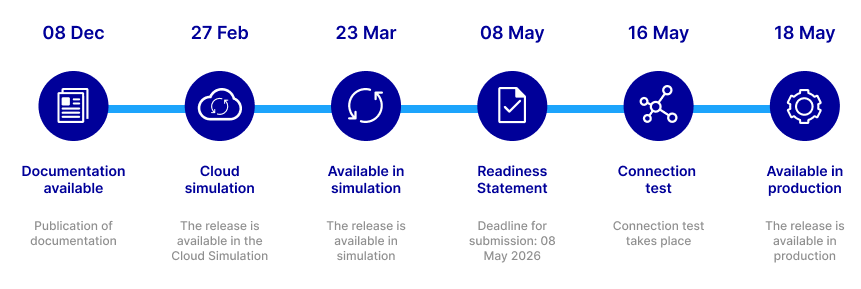
This is an embedded image

This section provides an overview of the available system documentation. You can find the Implementation News in the Data & Tech > Information Channels section.

GUI Solutions


Apr 24, 2026

T7 Release 14.1 - Derivatives Markets Gui Whats New, Version 1

This document provides compact information of the new GUI related features for the release.

Download

Apr 24, 2026

T7 Release 14.1 - Cash Markets Gui Whats New, Version 1

This document provides compact information of the new GUI related features for the release.

Download

Mar 09, 2026

T7 Release 14.1 - Web App Connectivity Guide Version 1

This document describes the connectivity options and setup process to access GUIs from the T7 Web App family.

Download

Mar 09, 2026

T7 Release 14.1 - Derivatives Markets - Participant and User Maintenance - Manual, Version 1

This manual is intended to assist service administrators who are responsible for maintaining participant and user related data in T7.

Download

Mar 09, 2026

T7 Release 14.1 - Cash Markets - Participant and User Maintenance - Manual, Version 1

This manual is intended to assist service administrators who are responsible for maintaining participant and user related data in T7.

Download

Mar 09, 2026

T7 Release 14.1 - Trader GUI, Admin GUI and Clearer GUI - Installation Manual, Version 1

This document provides information on Deutsche Börse's T7 GUI solutions, the T7 Trader GUI, T7 Admin GUI and T7 Clearer GUI from a technical point of view. The document explains how to establish connection to Deutsche Börse's T7 with the GUI solutions.

Download

Feb 27, 2026

T7 Release 14.1 Derivatives Markets Trader, Admin and Clearer GUI Manual, Version 1

This document provides information on the T7 Derivatives Markets GUI solutions, the Eurex Trader GUI, Admin GUI and Clearer GUI for T7. All views and functions of the T7 Derivatives Markets GUIs are described.

Download

Feb 27, 2026

T7 Release 14.1 Cash Markets Trader, Admin and Clearer GUI Manual, Version 1

This document provides information on the T7 Cash Markets GUI solutions, the Xetra Trader GUI, Xetra Admin and Xetra Clearer GUI for T7. All views and functions of the T7 Cash Markets GUIs are described.

Download


System Documentation

Circulars

Readiness Statement

Readiness Videos

Release Items/Participants Requirements

Feature/Enhancement 

Details

Action Item

Enhanced Drop Copy (EDC) Interface for Cash Markets

We are launching a new Enhanced Drop Copy (EDC) interface that provides a complete and consolidated feed of all client order activities, including "lean orders" which are not available in the current listener broadcast.


This offers Trading Participants a comprehensive overview of their order inventory for improved internal risk management and easier reconciliation. Clearing Members will be able to perform real-time, pre-trade risk monitoring by overseeing the complete order book activity of your trading participants.

To use this service, interested Trading Participants and Clearing Members must sign up for a new EDC session.


Clearing Members will also need to request and receive approval from their Trading Participants via the T7 Admin/Clearer GUI to access their order flow.

Auction Volume Discovery (AVD) in Continuous Trading

A new "Auction Volume Discovery" (AVD) order type will be introduced for all scheduled auctions on Xetra. By flagging an order as AVD, it can be executed at the auction price without influencing the price formation process itself.


This feature allows Trading Participants to execute large volumes while minimizing market impact. It also enables prioritized matching for internal orders from the same business unit when using an "Internalization ID," offering greater flexibility and control over your auction strategies.

To utilize this new order type, clients will need to adapt their trading applications and internal systems. Comprehensive testing in the provided simulation environment is strongly recommended to ensure the software is ready.

Quote Request Solution (QRS) in Continuous Auction

The Quote Request Solution (QRS) will be extended to the Continuous Auction with Market Maker trading model, which is currently used for structured products on Deutsche Börse Frankfurt.


This change allows you to directly request a quote from a Market Maker for an instrument. Following their response, you can accept the quote, which may lead to an execution within the next auction, streamlining the trading process for these specific products.

To take advantage of this new functionality, clients will need to ensure that their trading software is prepared for the changes. We encourage thorough testing in the simulation environment to confirm readiness.

Contacts

Connection, admissions, changes, functional member readiness

Without admission write to: client.services@deutsche-boerse.com

T: Please contact your Key Account Manager


Market Status XETR

XETR

The market status window is an indication regarding the current technical availability of the trading system. It indicates whether news board messages regarding current technical issues of the trading system have been published or will be published shortly.

Please find further information about incident handling in the Emergency Playbook published on the webpage under Data & Tech > Information Channels > Emergency procedures. Detailed information about incident communication, market re-opening procedures and best practices for order and trade reconciliation can be found in the chapters 4.2, 4.3 and 4.5, respectively. Concrete information for the respective incident will be published during the incident via newsboard message

We strongly recommend not to take any decisions based on the indications in the market status window but to always check the production news board for comprehensive information on an incident.

Emergency procedures

An instant update of the Market Status requires an enabled up-to date Java™ version within the browser.